
American Standard Smart Thermostats
Smart thermostats have become a major component of home-automation and energy-efficiency strategies. As the more general article on “smart thermostat” explains, features such as occupancy sensing, remote control, scheduling, and learning algorithms can help reduce energy consumption by avoiding heating or cooling when no one’s home.
For homeowners of American Standard systems, choosing a compatible smart thermostat means better integration with their HVAC equipment and the brand’s specific capabilities (such as diagnostics, remote access, and scheduling). According to American Standard, their Smart Thermostats “work smarter, not harder … including the ability to remotely control your home’s temperature.”
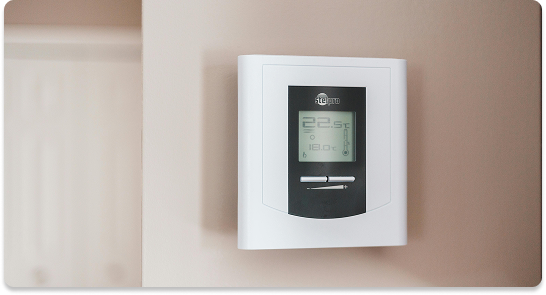
Here are some of the key features you’ll get when you opt for one of the American Standard smart thermostats (for example the Gold 824 model).
Key capabilities
WiFi connection + remote control: You can view/control your heating and cooling system from a smartphone, tablet or computer.
Colour touchscreen display: E.g., the Gold 824 has a 4.3″ colour touchscreen.
Scheduling / programming: Up to four (or more) periods per day for heating/cooling, depending on model.
Indoor humidity display: Some models show relative humidity levels. Weather info: Outdoor temperature, 5-day forecast and radar display (when connected online).
Z-Wave compatibility (in some models): For home-automation connectivity (lights, sensors, etc). The Gold 824 has a built-in Z-Wave bridge.
Diagnostics & alerts: The unit can generate service reminders, filter reminders, maintenance alerts.
Compatibility with the American Standard Home mobile app (or its ecosystem). For example, to enroll the device you follow WiFi → Smart Home mode → verification code.
Here’s what you stand to gain:
Convenience: Adjust your temperature remotely. Forgot to turn down the heat before leaving? You can do it with your phone.
Potential energy savings: By using scheduling, away modes, and remote control, you can avoid heating/cooling when it’s unnecessary.
Enhanced comfort: With better control you can maintain ideal temperatures, humidity display (for comfort), and integrate with other smart-home devices.
Better system awareness: If your thermostat gives alerts or diagnostics, you’ll be more aware of maintenance needs before they become big issues.
Modernisation of your HVAC system interface: If you have an American Standard HVAC system, pairing it with one of their own smart thermostats supports integration (matching brand, compatibilities).
While a smart thermostat sounds like a win, here are some practical items you should check before buying or installing:
Compatibility with your system: Not all thermostats will work with every HVAC system. The Gold 824, for example, supports conventional 24V central HVAC, heat pump, dual-fuel systems.
Installation complexity: Smart thermostats often require WiFi connectivity, possible C-wire (common wire) depending on your system, and proper wiring. The installation guide for the Gold 824 is detailed.
Location and signal strength: For WiFi connectivity you’ll need a proper signal from your router; mounting location matters.
Learning curve: Some of the advanced features (Z-Wave, automation, remote control) may require some setup or may be more than some users want.
Cost vs benefit: The initial cost (and maybe installation cost) needs to be weighed against the likely savings or convenience benefits.
Brand/eco-system lock-in: If you buy an American Standard smart thermostat, you may be somewhat tied into their ecosystem for full features (apps, diagnostics, etc.).
Warranty / support: Ensure you understand what the warranty covers and what remote features or cloud services may cost or depend on.
Hidden features you might never use: Z-Wave home-automation, full automation, etc. may be more than necessary. Simpler scheduling may suffice.
Here’s a rough outline of how you’d go about upgrading to one of these thermostats (leveraging the Gold 824 / UX360 as examples).
Check your current system
What type of HVAC system do you have (heat pump, conventional, dual fuel)?
Is there a common (C) wire available for the thermostat?
Check location for signal strength, wiring etc.
Purchase a compatible model
For example: the Gold 824 smart control. (Features listed above)
Ensure you purchase from a trusted dealer or installer.
Turn off power
To avoid damage or shock, turn off power at furnace/air handler and/or breaker.
Remove old thermostat & note wiring
Label wires, photograph terminals, note wire colours.
Mount and wire the new thermostat
Follow installation instructions carefully (e.g., for the 824: turn off power, mount sub-base to wall, connect wires, optionally Ethernet or WiFi).
Ensure proper placement away from direct heat, registers, external walls etc.
Connect to WiFi
On the thermostat: Menu → Settings → Network → Connect to WiFi network.
Register/enroll the thermostat
Using the mobile app (e.g., American Standard Home app) or web portal: select “Connect New Device”, choose thermostat model, obtain a 5-digit code, enter the code into the thermostat.
Follow on-screen prompts to complete enrollment.
Configure schedule & settings
Enable scheduling: Menu → Settings → Schedules. Define Wake/Away/Sleep routines.
Configure humidity display, fan mode, alerts, filter reminders as you desire.
Test operation
Set “Away” schedule and then return, see if temperature adjusts.
Use mobile app to change temperature remotely and confirm changes take effect.
Check if alerts or diagnostics screen display correctly.
Enjoy and monitor
Over the next days/weeks track how the system behaves. Use remote control when away, adapt schedule as needed.
Consider if your usage gives energy savings or improved comfort.
Use the “Away” mode proactively: If you leave the house for a few hours, reduce your heating/cooling setpoint more aggressively — the remote access makes this trivial.
Set realistic schedules: Even if you have advanced programming, simpler schedules that match your real life will often save more than constantly tweaking.
Check wiring if you run into issues: If thermostat displays odd temperatures or seems off, check if the wiring or placement is causing bias (thermostat too near draft, direct sunlight, heat register). The documentation for the 824 warns about sensor bias from the touchscreen’s own heat if airflow is misdirected.
Don’t neglect maintenance: Even the smartest thermostat won’t compensate for an HVAC system that’s dirty, has poor airflow, or needs service. Use the alerts to stay on top of filters, routine tune-ups.
Beware of placing it behind a door, or near strong airflow: For best temperature sensing, choose a wall away from supply vents, external walls, or sources of heat.
Check WiFi signal strength: If your router is distant or signal is weak, thermostat might struggle with remote features. Consider repositioning router or using extender.
Identify real savings: Track before/after energy usage. Even a few degrees change over a day/week adds up. Smart scheduling may reduce unnecessary run time.
Future-proofing: While American Standard offers its own ecosystem, also consider if you may want to integrate with broader smart-home systems (Alexa, Google Home, Apple HomeKit). Ensure compatibility.
Professional vs DIY install: Many homeowners can install thermostats themselves, but if your system is complex (multi-stage, variable speed, communicating HVAC) professional installation may save headaches.
In many cases: yes — if you value convenience, remote access, energy-savings and have a compatible system, a smart thermostat from American Standard can make good sense. However, if your system is very simple, your behaviour doesn’t vary much (i.e., you’re home most of the time), or you prefer minimal tech, a simpler programmable thermostat may suffice.
Given that American Standard’s smart thermostat offerings provide robust capabilities (remote control, diagnostics, scheduling, humidity display, etc.), they represent a premium upgrade over basic thermostats.
If I were to summarise:
Best for: Homeowners with an American Standard HVAC system who want modern control, remote access, automation and are comfortable with a slightly higher upfront cost.
Not ideal for: Renters (installation might be limited), homes with non-compatible wiring or HVAC systems, or those who don’t care about remote/automation features and just want manual control.
Upgrading your thermostat is a relatively small investment in the broader scope of HVAC costs, but it can yield meaningful benefits in comfort, control and energy efficiency. With the American Standard smart thermostat line, especially models like the Gold 824 (and newer lines like UX360), you get a high-quality integration with a trusted HVAC brand.
If you decide to go ahead, make sure you check compatibility, wiring/c-wire, WiFi signal, and plan your schedule settings upfront for maximum benefit. Over time you’ll likely appreciate the ability to adjust settings from your phone, let your system adapt to your lifestyle, and maybe even see a small dip in your energy bills.